
Always remember you're unique. Just like everyone else.

Install the app
How to install the app on iOS
Follow along with the video below to see how to install our site as a web app on your home screen.
Note: This feature may not be available in some browsers.
You are using an out of date browser. It may not display this or other websites correctly.
You should upgrade or use an alternative browser.
You should upgrade or use an alternative browser.
*** WARNING ***
- Thread starter Farquard
- Start date


Memory and SSDs, I believeThanks for the warning Farquard. What, exactly do they sell? I've not heard of them before now.

somancky
Concierge
Thanks for posting this .

A Lodge Brother whom I mentioned this to, said he could have saved me a lot of aggravation. The company he works for, found this out a while ago, after purchasing from a local retailer and having a few failures. The local retailer (a national store chain) told his company that the SSDs and the MEMORY modules would have to be taken care of from Micron/Crucial directly via their RMA/Warranty program. Well, all of the defective items were rejected! As they were not purchased directly from Micron/Crucial, but from an "Authorized Reseller". Seems that if you do not pay full retail price they do not feel they have to replace an item that fails during their 5 year warranty period.

sickpuhpee
V I P
- Joined
- Jan 8, 2014
- Messages
- 2,705
- Reaction score
- 1,770
- Points
- 113
My first home PC was a Micron branded unit back in 2000. 1gig CPU and 128 MB of ddr2 (or was it just DDR?) with Windows ME. Paid 1300 bucks back then.

My first home PC was a Micron branded unit back in 2000. 1gig CPU and 128 MB of ddr2 (or was it just DDR?) with Windows ME. Paid 1300 bucks back then.
I think I got my first one, just shortly before you did.. in '99. Pentium 500Mhz, with 128.. was Micron as well. I got it with Windows 98SE, and cringed at ME... haha, but that's another story.
Thanks for the update on this Farquard.

First home computer didn't happen until about 2000/2001 however, I had been using pcs since I was 11..I learnt basic on RML 380/480z's. I also learnt cecil and programmed cecil. I also studied fortran and cobol....
In the time since I posted that warning, I have heard from quite a few people that they had been refused a warranty replacement on a drive they bought directly from them. One person took a drive apart and was shocked to find that 2/3rds of the drive enclosure was empty! The was a very small motherboard and it had just two 3/16th thick chips on it.
He sent me a picture of what was inside, along with a picture of a Western Digital drive (both 1 Terabyte in size) and the WD enclosure was full from front to back and side to side. Here is the image he sent me.

He sent me a picture of what was inside, along with a picture of a Western Digital drive (both 1 Terabyte in size) and the WD enclosure was full from front to back and side to side. Here is the image he sent me.

- Joined
- Apr 29, 2013
- Messages
- 210,956
- Reaction score
- 100,902
- Points
- 113
I dont disagree with you, but this picture look very like someone badly edited it in PS using a very old image for the WD. & the 2nd has some components cut in half so incomplete.
Wait til you get a "proper" drive and it suddenly can't be accessed in anyway, after transferring a small amount. They told me to plug it into the rear usbs and that did bugger all.....
I cannot personally attest to the WD drive, as I am not about to open one of mine up, but I did open the drive that would not work for me after fighting (er,,, arguing) with every one that I could, and the image on the right side is the same as the drive that failed that i have sitting on my bench. I was shocked to see how crappy it was inside, as I too thought that the photograph was an attempt to portray something other than what it was supposed to be.I dont disagree with you, but this picture look very like someone badly edited it in PS using a very old image for the WD. & the 2nd has some components cut in half so incomplete.
I do intend when my 'brother from another mother' comes over, and have him look through my scrap parts bin (I no longer can walk down stairs), as I never through any components away, and see if I do have a WD SSD drive, as I know I have replaced a few over the years, and then will see what it looks like insde.
I know that one of my lodge brothers got a Crucial drive and was in the middle of cloning from another of their drives, when it all of a sudden gave him a message that the destination drive failed. He took it back to dealer where he got it, and they gave him another drive no questions asked. He was at the store this past week and the assistant manger told him that Crucial refused to accept the drive back from them, a retailer, without saying why. They just out right refused. That dealer is having a closeout on them, and does not intend to offer them for sale in the future.Wait til you get a "proper" drive and it suddenly can't be accessed in anyway, after transferring a small amount. They told me to plug it into the rear usbs and that did bugger all.....
I reached out to a friend who is the General Manager of a "BIG BOX" computer retailer, he sent me this just a bit ago.

Size matters.
Well... even though I'd have to open the one Crucial 1TB I do have.. or perhaps the 2TB... these came up from a search from those that love to tear things open.
First up, we have the 480GB circuit board. I'm thinking, this looks similar in size to the one pictured above.

Then.. and this I could verify, is the 1TB/2TB circuit board. Even this one, from Crucial (MX500 series), doesn't have four, half circle cut outs to fit the enclosure. Unlike the one of the left, pictured above.

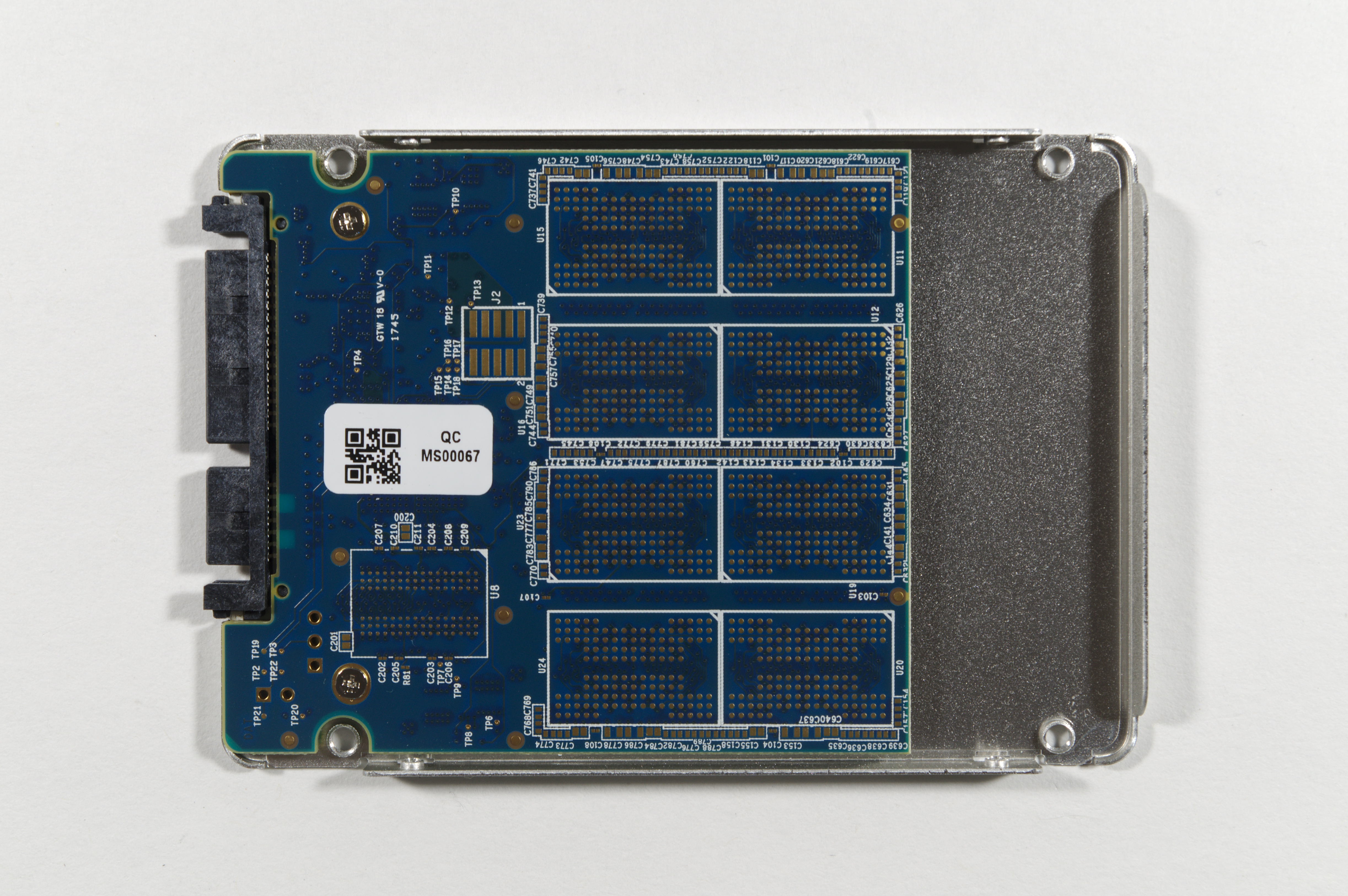
Like I mentioned though, without seeing the casing around that smaller circuit board, I'd guess that it was a 256 to 500MB, not the 1TB.
Well... even though I'd have to open the one Crucial 1TB I do have.. or perhaps the 2TB... these came up from a search from those that love to tear things open.
First up, we have the 480GB circuit board. I'm thinking, this looks similar in size to the one pictured above.
Then.. and this I could verify, is the 1TB/2TB circuit board. Even this one, from Crucial (MX500 series), doesn't have four, half circle cut outs to fit the enclosure. Unlike the one of the left, pictured above.
Like I mentioned though, without seeing the casing around that smaller circuit board, I'd guess that it was a 256 to 500MB, not the 1TB.
Online statistics
- Members online
- 34
- Guests online
- 136
- Total visitors
- 170
Totals may include hidden visitors.