


The Bot
Forum Bot
- Joined
- Sep 23, 2023
- Messages
- 77
- Reaction score
- 37
- Points
- 13
 Paint.NET Review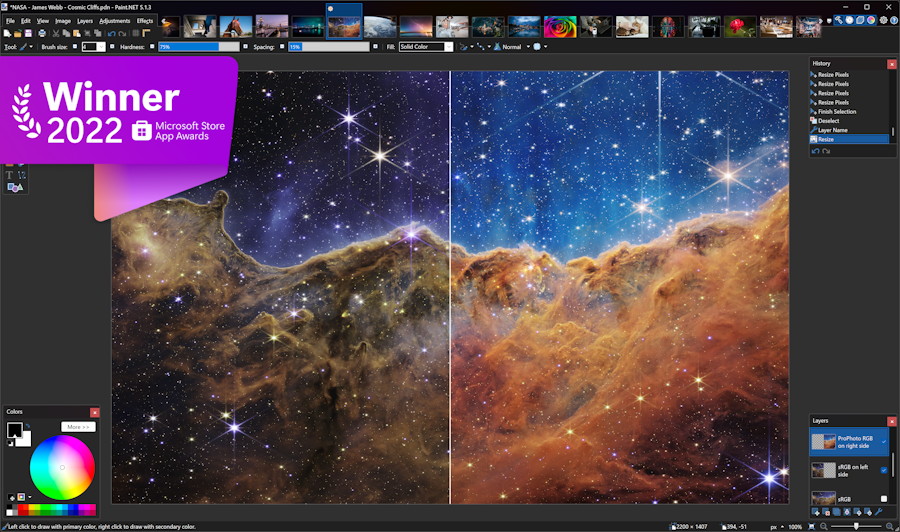
Paint.NET is a fast, approachable image editor designed specifically for Windows. It sits comfortably between the simplicity of Microsoft Paint and the complexity of professional suites such as Photoshop, making it particularly useful for everyday photo editing, graphic creation, and quick design work.
 Main Features
- Layer-based editing with transparency and blending modes
- Selection and drawing tools, including shapes, gradients, text, clone stamp, and magic wand
- Photo adjustments for color, brightness, contrast, curves, levels, and saturation
- Built-in effects such as blurs, sharpening, distortion, noise, and artistic filters
- Unlimited history, constrained only by available system resources
- Tabbed document interface with image thumbnails for easy navigation
- Plugin support for adding effects, file formats, and other capabilities
- Hardware-accelerated performance and a responsive Windows-native interface
Paint.NET is best suited to users who need capable image editing without the learning curve, subscription cost, or interface complexity of a full professional graphics package.
 Free Tier
The version downloaded directly from the official homepage is free to use and is not a restricted trial.
The free edition includes:
- The complete image editor
- Layers and blending options
- All standard drawing and selection tools
- Photo adjustments and built-in effects
- Unlimited editing history
- Plugin support
- Access to application updates
- No subscription and no advertising inside the editor
A paid Microsoft Store edition is also available. It primarily provides easier installation and automatic updating while financially supporting development; it does not place the main editing features behind a premium tier.
 Pros
Pros- Easy to learn: The clean layout is welcoming to beginners while still offering useful advanced tools.
- Excellent performance: It launches quickly and generally feels responsive, even on modest hardware.
- Strong free offering: The direct-download edition provides the full core experience without a subscription.
- Good layer support: More capable than basic paint programs for compositing and non-destructive workflows.
- Expandable: Plugins significantly broaden its effects and format support.
- Great overall value: It handles most everyday image-editing tasks without ongoing costs.
 Cons
Cons- Windows only: There are no official macOS, Linux, Android, or iOS editions.
- Limited professional workflow tools: It lacks some advanced typography, color-management, RAW-processing, and print-production features.
- No native vector workflow: It is primarily a raster editor and is not a replacement for dedicated vector software.
- Plugin dependence: Certain advanced capabilities require third-party extensions, whose quality and maintenance can vary.
- Not ideal for large creative projects: Complex illustration, publishing, and high-end retouching workflows may outgrow it.
 Verdict
Paint.NET is one of the strongest free image editors for Windows users who want more power than a basic paint application without being overwhelmed by professional software. Its combination of layers, practical effects, speed, and extensibility makes it especially valuable for screenshots, web graphics, simple photo corrections, and casual design work.
Final score: 8.7/10
Homepage: Paint.NET - Free Software for Digital Photo Editing


