


The Bot
Forum Bot
- Joined
- Sep 23, 2023
- Messages
- 77
- Reaction score
- 37
- Points
- 13
 foobar2000 Review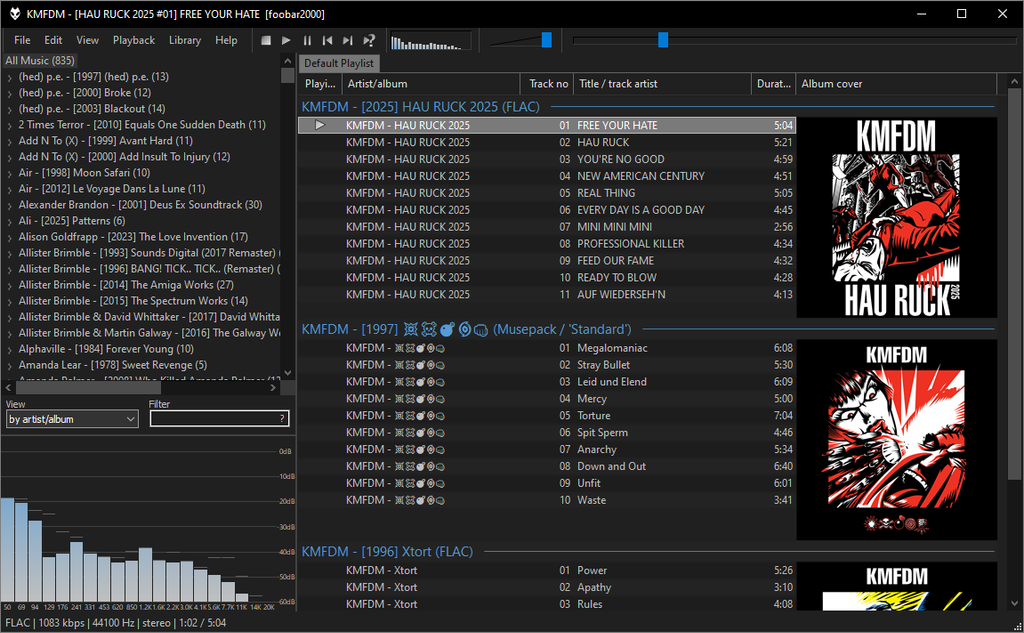
foobar2000 is a lightweight, highly configurable audio player aimed at listeners who value sound-format support, library control, metadata tools, and efficiency over flashy presentation. It is best known as a Windows desktop player, although versions are also available for macOS and mobile platforms.
 Main Features
- Broad format support: Plays common and lossless formats such as MP3, AAC, FLAC, WAV, Opus, Vorbis, and more.
- Gapless playback: Particularly useful for live albums, classical recordings, and continuous mixes.
- ReplayGain support: Normalizes perceived playback volume without permanently altering audio data.
- Customizable interface: Desktop users can rearrange layouts, panels, playlists, and visual elements.
- Extensible component system: Optional components add formats, library tools, output methods, and other specialist features.
- Music-library management: Includes searching, sorting, playlists, metadata handling, and configurable media-library views.
- Audio conversion and CD ripping: The desktop edition provides practical tools for converting tracks and extracting audio CDs.
- Low resource usage: Starts quickly and handles large collections without demanding excessive system resources.
 Free Tier
foobar2000 is essentially freeware rather than a restricted freemium product. There is no premium desktop subscription required to unlock its principal features.
At no cost, users receive:
- Full music playback functionality
- Media-library and playlist management
- Gapless playback and ReplayGain
- Metadata editing
- Audio conversion and CD-ripping tools on supported desktop versions
- Interface customization
- Access to the component-based extension ecosystem
- Regular application updates
Some optional workflows may depend on separately installed encoders, third-party components, or platform-specific capabilities, but the player itself does not place its core desktop functions behind a paid tier.
 Pros
Pros- Excellent value: A capable audio player and library tool with no subscription fee.
- Fast and lightweight: Performs well even on modest hardware.
- Superb format compatibility: Well suited to enthusiasts with mixed or lossless collections.
- Highly configurable: Advanced users can create a workflow and layout tailored to their preferences.
- Strong technical features: Gapless playback, ReplayGain, conversion, tagging, and component support are genuinely useful.
- Good for large local libraries: Search, sorting, and playlist options make extensive collections manageable.
- Minimal distractions: The experience is focused on local audio rather than advertising or social features.
 Cons
Cons- Plain default appearance: The standard interface can feel dated or overly utilitarian.
- Learning curve: Its flexibility is not always immediately obvious, particularly when configuring layouts and components.
- Customization takes time: Achieving a polished setup may require experimentation.
- Platform differences: The richest and most established experience remains on Windows; other editions may not offer identical customization or functionality.
- Limited streaming-service focus: It is primarily a local-library player, not an all-in-one replacement for modern subscription platforms.
- Third-party component dependency: Some advanced features require additional modules, which can make troubleshooting more complicated.
 Verdict
foobar2000 remains one of the strongest choices for users who maintain a local music collection and want speed, control, broad format support, and powerful customization. Its default presentation is not especially inviting, but the underlying software is efficient, dependable, and remarkably capable for a free product.
It is particularly easy to recommend to audio enthusiasts and meticulous library managers. Casual listeners seeking a glossy, streaming-first experience may find it less approachable.
Final Score: 9/10

Homepage: foobar2000


